31 Aug 2014

Calendar 2014 v11, for Sept.

#23 Calendar 2014 v11, for month Sept.

I made a new version (v11) of my Excel Calendar, which is the same as v10, but I updated the month-calendar for September, and included the days in this month of a big sport-event here in Spain: Spain 2014 FIBA Basketball Worldcup, see fig.1. If you are interested in this event, I made an Excel with the match-schedule, see post:

http://worktimesheet2014.blogspot.com.es/2014/08/worldcup-basketball-2014-match-schedule.html


fig.1: Calendar month Sept.


Downloads:

#Mirror 1 (PDF file):

http://es.scribd.com/doc/238226627/Month-Calendar-201409-Sept

#Mirror 2 (Excel file):
NB: this site has MS Onedrive, which has 'Excel-Online', so you can view my Excel-calendar here if you don´t have MS Excel on your PC

https://onedrive.live.com/redir?resid=3F963E9F1A42D952%21241

#Mirror 3 (1 zip file with Excel and PDF files):


https://drive.google.com/file/d/0BywxxSJoaUYxeWU2d0haTlpDbDQ/edit?usp=sharing


Worldcup Basketball 2014 Match Schedule

#22  Worldcup Basketball 2014 Match Schedule


Note 14-9: Update Excel after final, V6
  Note 10-9: Update Excel after matches of today, V5

Note 9-9: Update Excel after matches of today, V4

Note 8-9-2014:
I updated this Excel after the 1/8 finals with the 1/4 finalists (V3).

Note 6-9-2014:
Now the group-phase has ended and the 16 1/8 finalists are known, I updated this Excel, to which I refer below with v2. Besides, I also included a bracket (tournament schema in tree.from for finals), see fig.2.

Spain was counting down for the Spain 2014 FIBA Worldcup Basketball , but now it has finally started! And in Madrid, basketball is everywhere now, for some photos I made, see:

https://www.flickr.com/photos/46731978@N00/sets/72157647082847479/

I made an Excel with the match-schedule for this event, see. fig.1. It is in the same style as the Excel I made for the Soccer Worldcup, see post:

http://worktimesheet2014.blogspot.com.es/2014/05/excel-with-match-schedule-for-2014-fifa.html

so see that post for more info about the format of the match-schedule.

To make this Excel, I used:

http://fiba-2014.com/fiba-2014-schedule-fixtures-matches/

and

http://en.wikipedia.org/wiki/2014_FIBA_Basketball_World_Cup

which has the data about the matches and teams in table-format, which made it easy to import it using PowerQuery, about which I wrote in this post:

http://worktimesheet2014.blogspot.com.es/2014/05/excel-2013-and-business-intelligence.html

In Download-mirror #2 you can see in Excel v0 the result of this import. To come to the final version of the match-schedule, was more work then I thought, mainly because the data in the table was not 100% structured (e.g. date and time in 1 column) and even had some errors. To prevent this kind of errors, I made some pivot-tables (see sheet3-5 in my Excel) which has checks like: all groups have same number of games, at 1 time and place there is only 1 game (no 'over-booking') etc.

Well, I hope with my Excel you´ll enjoy the Worldcup Basketball even more.
Go Gasol, go ÑBA!

NB: Some links with more info about the Worldcup:

http://www.fiba.com/spain2014

http://www.fiba.com/basketballworldcup/2014

http://as.com/especiales/baloncesto/mundial/2014/calendario.html

http://www.marca.com/deporte/baloncesto/mundial/calendario.html

fig.1: Match Schedule Worldcup Basketball


fig.2  Match Schedule Worldcup Basketball in bracket-fomat

NB: to create this bracket, I used this Excel-template from the MS website:


Downloads:

#Mirror 1 (PDF file):

http://es.scribd.com/doc/238226655/Spain-2014-FIBA-WorldCup-Basketball


#Mirror 2 (Excel file):
NB: this site has MS Onedrive, which has 'Excel-Online', so you can view my Excel-calendar here if you don´t have MS Excel on your PC

https://onedrive.live.com/redir?resid=3F963E9F1A42D952%21240


#Mirror 3 (V1: 1 zip file with Excel and PDF files, V2: bracket-schema and 1/8 finalists):

V1:
https://drive.google.com/file/d/0BywxxSJoaUYxZDhKd2JnTmhaTUk/edit?usp=sharing

V2:
 https://drive.google.com/file/d/0BywxxSJoaUYxekRyRU50WlRlM1k/edit?usp=sharing

V3:
https://drive.google.com/file/d/0BywxxSJoaUYxNzlITjB6aGc1SVk/edit?usp=sharing


20 Aug 2014

Calendar 2014 v10: with week-nr and new month-calendar

#21 Calendar 2014 v10:  with week-nr and new month-calendar

I made a new version (v10) of my Excel Calendar, which is the same as v9 (see post #19) + :

- year-calendar with ISO-week-numbers, see fig.1
NB: I recently learnt that the use of week-numbers is very common in Switzerland, see:

http://vowe.net/archives/008475.html

- new month-calendar, which has besides the actual month also the previous and next month, and some extra things to make the calendar less grey.., see fig.2


fig.1 Year calendar with week-numbers, numbers before Mon. and after Sun., between ( and )

fig.2: Month-calendar


Downloads:

#Mirror 1 (Excel file)
NB: this site has MS Onedrive, which has 'Excel-Online', so you can view my Excel-calendar here if you don´t have MS Excel on your PC

https://onedrive.live.com/redir?resid=3F963E9F1A42D952%21238


#Mirror 2 (1 zip file with Excel and PDF files)

https://drive.google.com/file/d/0BywxxSJoaUYxdUdHcDB6b09VSFU/edit?usp=sharing


31 Jul 2014

Vacations planner in Excel

#20 Vacations planner in Excel

The Excel in this post is a vacations planner. It has all dates of 2014 and for every resource (team-member) you should mark with a number which date(s) he wants to take his vacation (by team-member) and if that is possible or not (by team-boss), like this:
 1: applied (yellow)
 2: aproved (green)
 3: refused (red)

Below you can see a small example of a company with 2 employers (John and Jane) which have to agree about their vacation-dates, in a way there is always at least 1 person at the office.


fig.1: on 3-2-2014 John and Jane wanted the same day off and Jane 'won'


fig.2: in August John and Jane both want to take a 2 week vacations, and there were no planning-conflicts


fig.3: On 31-12-2014 John and Jane both want to take a day off and they didn´t decide yet who can go


Downloads

#Mirror 1:
NB: this site has MS Onedrive, which has 'Excel-Online', so you can view my Excel-calendar here if you don´t have MS Excel on your PC


#Mirror 2:


Calendar 2014 v9: year/month/week-calendar in Excel

#19 Calendar 2014 v9: year/month/week-calendar in Excel

I made a new version (v9) of my Excel Calendar, which is almost the same as v8 (see post #10), only I added 2 sheets with a month and week-calendar (v8 only had a year-calendar), see fig.1 for a photo of this calendar (printed and sticked on blackboard).

fig.1: printed Excel calendar (year/month/week)


The month-calender I made from the year-calendar, by copy/paste a month of the year-calendar (a 7x6 table in sheet Calendar-2) to sheet tMonth.

fig.2: month-calendar (e.g. July 2014)


The week-calendar is a table with the hours (from 07:00 to 23:00, assuming the other hours you don´t have anything to do) and the 7 weekdays (so without dates) and per day it also has 5 'free fields' to note things which should be done that day but not at any specific time.

fig.3 week-calendar template


For the v9 calendar I also made 2 sub-versions:
- v.9a: Excel for Madrid capital (with local holidays)
- v.9b: Excel for everywhere else then Madrid-capital  (without local holidays)

Rember the Excel-calendar is multi-language (7 possible languages), just select in sheet-1 (Info) in cell A19 your language. In par. Downloads I included a Spanish version of v9a and an English version of v9b in PDF-format (I printed the Excel with a program that can print to PDF (so generate a PDF-file instead printing it on paper), e.g. CutePDF, see:

http://www.cutepdf.com/


Downloads

#Mirror 1 (Excel file)
NB: this site has MS Onedrive, which has 'Excel-Online', so you can view my Excel-calendar here if you don´t have MS Excel on your PC

- v9a:
https://onedrive.live.com/redir?resid=3F963E9F1A42D952%21231

-v9b:
https://onedrive.live.com/redir?resid=3F963E9F1A42D952%21232


#Mirror 2 (1 zip file with Excel and PDF files)

https://drive.google.com/file/d/0BywxxSJoaUYxQ0s1XzE5UVZfcTA/edit?usp=sharing

30 May 2014

Match, Access app to track World Cup Soccer 2014

#18  Match, Access application to track World Cup Soccer 2014


Note 29-7-2014:
I updated the Match-database (MDB-file)  with all the match-results and made a backup of the file after every phase, which you can find (as a zip) in par. Downloads. I refer to this MDB with V2 and to the original MDB with V1. In part 2 of this blog you can see the results, in which I used the match Spain - Netherlands (..) to show which match-data you can registrate in Match.


Part 1 (before start Worldcup):


The Excel-reports for the 2014 FIFA Worldcup Brazil from my previous post, see:

http://worktimesheet2014.blogspot.com.es/2014/05/excel-with-match-schedule-for-2014-fifa.html


were generated by Match, a program I made some time ago to track the UEFA Eurocup and FIFA Worldcup competitions, and which I offer you for free to do the same for the 2014 Worldcup (see Downloads below).


I made Match with MS Access 97. MS Access is  (like MS Excel) part of MS Office (although it is not included in the cheaper Office-versions). If you don't have Access on your PC, don't worry, because Match includes the Access (97)-runtime, which means that once you have installed Match, you also have Access (or I should say: you have the Access-components which Match needs, e.g. the Jet database engine). And if you wonder if a program from 1997 still works in 2014, I can tell you I tested it on 3 PC's: 
- Windows XP with Office 97 Profesional (with Access)
- Windows 7 with Office 2010 Starter (without Access)
- Windows 8 with Office 2013 Profesional  Plus (without Access installed)
and on all 3 PC´s Match worked OK.

Although this blog is about MS Excel, I wanted to make an exception in this post and tell you something about MS Access.

Access is a desktop relational database application. See post #13 for more about relational databases:

http://worktimesheet2014.blogspot.com.es/2014/04/excel-and-relational-databases.html


With Access you build quite easily an application, type 'Windows-desktop'. And because all Office-applications have OLE Automation, they can easily 'communicate' with each other, a feature which I used to generate the Excel-reports from Access (Match). And Access it's own reports you can export in e.g. RFT-format, which you can read in MS Word. 
Access offers you the possiblity to split your application in 2 parts: a Front-End (MDE) executable ('client'), which has the user-forms and logic (functions) and a Back-End, the (MDB) database ('server'). I used this for Match, so it has a 'client-server' architecture: Match_v6_FE.mde is the client (Front-End) and Match_v6_BE.mdb (Back-End) is the server.

Let me now tell you something about Match. 
Match is software with which all 'administrative tasks' for a sport-competitions can be automated, like:
 * making a match-schedule 
 * registrate the match-results (goals, players who scored, yellow/red cards etc)
 * calculating ranking teams and topscorer-list 
 * generating reports in both textual and graphical format, e.g. a match-schedule with locations on y-axis and dates on x-axis.
* betting on match-results and teams for rank 1,2,3, 4 in e.g. Worldcup

As I said before, I originally made Match to track Euro/Worldcup competitions, but Match can be used for every simular competition. To illustrate this: once I made a 'tailor made' version of Match for a big school-soccer tournament in the Netherlands see:

http://www.rotarystreetsoccer.nl/

and for some reports generated by Match:

Some statistics of this tournament 'Rotary Street Soccer Oldenzaal': 18 schools and about 300 teams, more than 2000 children who play about 700 matches. 


But now about the Match version for 2014 FIFA Worldcup Brazil. I already filled Match with the whole match-schedule (so not only the matches in phase 1 (qualifications), but also the 'virtual matches' in the final-phases (1/8-final, 1/4-final etc) and all the teams (and all the 32 flags...). So if you want to use Match to track the Worldcup, you only have to enter the match-results (see fig.1 for the form where you must input the match-results) and use the functions to copy the teams who qualified in round N to round N+1. 


fig.1: Form to input match-results (blue fields)


For more details about how to use Match, see these user-manuals:


* User Manual Match for Worldcup 2014:

http://www.scribd.com/doc/227239062/Match-v6-UserManual-for-WorldCup2014


* User Manual Match (general):
* User Manual for organizing a Worldcup-Pool (betting) with Match:
Before this 'release' I tested Match by doing a simulation of the whole tournament, that is: I entered (random) scores for all matches, and I made a backup of the database (MDB-file) at the end of every phase. I included this database-backups, see  Downloads.  So if you want to see the result of my simulation of the Worldcup at the end of phase X, you must change the name of the backup-file for phase X to 'Match_v6_BE.mdb'. In fig.2 you can see how Match looks like before the begin of the tournament And for the final-result of my simulation, see fig.3 (from file 'Match_v6_BE_Phase5_end.mdb'), which shows in my prediction, the winner of this Worldcup will be  ... Brazil, beating Spain with 1-0 (see Match ID 64).

To end this post with Excel again: 
A nice Excel with which you can also track the Worldcup (and which I used to validate the results of my simulation of the Worldcup with Match) is: 
But whether you use Excel or Access to track the Worldcup, the conclusion could be that MS Office is a great software suite for doing this, and with this blog I wanted to show you another member of the Office family.

And there are also many smartphone apps for the Worldcup. One of them of course by FIFA, but after having seen this video about FIFA:

https://www.youtube.com/watch?v=DlJEt2KU33I

I decided to look for something else, and found this nice (Dutch) app:

http://m.apps.store.aptoide.com/app/market/nl.itnext.ec2012/31/5333597/World%20Cup%202014

And if you think Match could be something for your club, write me an email, with subject 'Request info Match'.


Note 8-6-2014:


During the WorldCup I'll update this blog with the results after every phase, and also include the Match_BE.MDB database file, so if you want to use Match to track the Worldcup, you can use this database.

And maybe I'll publish it also on my new own free TK-domain, from the (is)land of Tokelau :)   

http://www.eigersoftware.tk/


Figures simulation of WorldCup 2014 in Match:


fig.2: After phase 1 (qualifacions)


fig.3: After final 


Part 2 (after end Worldcup)

I use the match Spain - Netherlands (1-5 !) to show what match-data you can registrate in Match.


fig.4: Match details (teams, date,time, location, referee) and result


fig.5: goals

--
fig.6: yellow&red cards


fig.7: line-up and mark (for performance, 0-10).
NB: marks for Dutch players in this match I copied from:

--
And Match can generate a Word-report with all these data in this format:

** match #3:  Spain - Netherlands; 1 - 5 ** 

goals:  *T.27 Alonso X. (Spain) (PNL), *T.44 van Persie (Netherlands) ,  *T.53 Robben (Netherlands) ,  *T.64 de Vrij (Netherlands),   *T.72 van Persie (Netherlands),   *T.80 Robben (Netherlands)   


cards:  *T.25 de Guzman (Netherlands) yellow_card, *T.41 de Vrij (Netherlands) yellow_card, *T.65 Casillas (Spain) yellow_card, *T.66 van Persie (Netherlands) yellow_card 

lineup player_away:  Cillessen Vlaar de Vrij (*T.out: 77),  Martins Indi Blind, de Jong, Janmaat, de Guzman (*T.out: 62),  van Persie(C) (*T.out: 79),  Sneijder, Robben, Veltman (*T.in: 77),  Lens (*T.in: 79),  Wijnaldum (*T.in: 62) 


Details: location:Salvador , date: 13/06/2014 , referee: Rizzoli 


Besides this match-details which you can register in Match, on the FIFA-site you can find some more interesting statistics, see:


And to finish this part about the Spain - Netherlands match:  for the readers who might wonder what photos were published in the Dutch media after this match, I include this link (my favourite is photo #1, van Persie as a bullfighter):

http://comee-nl.tumblr.com/post/88703089661/de-mooiste-fotos-van-spanje-nederland-wk-2014


And to conclude this post, I´ll show some figures of reports generated by Match V2 (with all results Worldcup) (reports are included in par. Downloads):


fig.8: match-results per group 


fig.9:  All match results (from all phases)


fig.10: Ranking teams per group (end phase 1)


fig.11: End ranking teams


fig.12: Topscorer-list

NB: I only registered the goals made in the match Spain - Netherlands


Downloads :

V1: 

* Application: Match-installer:

http://goo.gl/5dzEiM

* Backup databases simulation of WorldCup 2014 in Match:

https://drive.google.com/file/d/0BywxxSJoaUYxZmc3VmlUdXF3MDg/edit?usp=sharing


V2:

* Backup databases results of WorldCup 2014 in Match:

https://drive.google.com/file/d/0BywxxSJoaUYxXzRhUjRxa1AxVmc/edit?usp=sharing

NB: to view a MDB-file with the Match-application, you must rename the file to: Match_v6_BE.mdb

* Reports results of WorldCup 2014 in Match:


28 May 2014

Excel with Match Schedule for 2014 FIFA World Cup Soccer Brazil

#17 Excel with Match Schedule for 2014 FIFA World Cup Soccer Brazil

For the upcoming Worldcup Soccer I made 3 Excels with the match-schedule, in 3 formats:
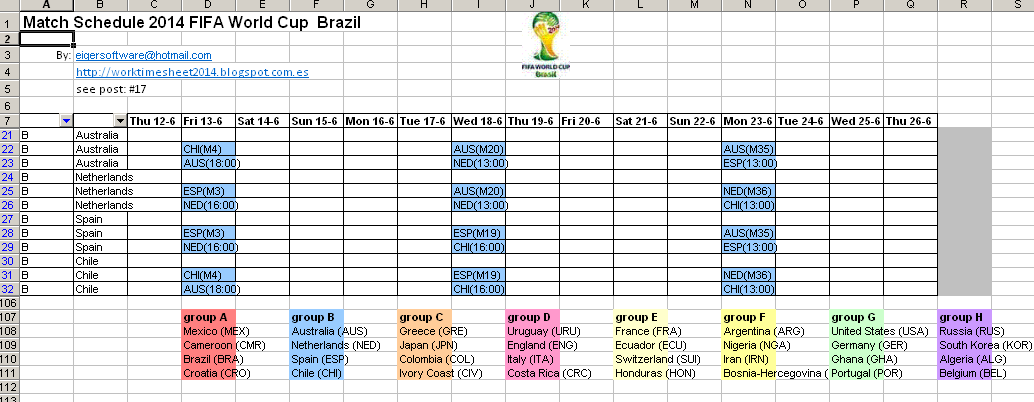
-1: Calendar (see fig.1)
-2: Table, with times of your timezone (see fig.2)
-3: Matrix (see fig.3).

To create these Excels, I used a database-program that I once made (with MS Acces 97...), Match, which I used since 2004 until now to track the UEFA and FIFA soccer championships.
In a next post I'll write more about Match, but if you already want to know something more about it, see this webite:

http://eigersoftware.tripod.com/match.htm

or for the Excel-reports that I created with Match for the UEFA and FIFA soccer championships from 2004 until now:

http://www.scribd.com/eigersoftware


The source for the Excel match-schedules is from the FIFA site:

http://resources.fifa.com/mm/document/tournament/competition/01/52/99/91/2014fwc_matchschedule_wgroups_22042014_en_neutral.pdf

which is in calendar-format (as in fig.1), and shows for every match this information:
- Match-ID
- Teams and 'virtual teams' for final-rounds (e.g. team A1 is winner (rank 1) of group A)
- Group (A-H)
- Date and time (in local (Brazilian) time
- City (stadium)


fig.1a: match schedule in Calendar format, with Location on y-axis


fig.1b: match schedule in Calendar format, with Group/Team on y-axis


fig.2: match schedule in Table format


fig.3: match schedule in Matrix format


Match schedule 1: Calendar format (see fig.1a, 1b)

Fig. 1a:
This schedule is like the schedule on the FIFA site. The only difference is the way I labeled the matches for the final-rounds, e.g.:
- match 49 on Sat.28-6, 1/8-finals, is in cells R13-R14, marked as 'M49', with 'virtual teams' A1 (winner group A) and B2 (runner-up group B)
- match 63 on Sat.12-7 (final for rank 3/4) is in cells AC16-AC17, marked as 'M63', with 'virtual teams' M62R2 (loser semi-final match 62) and M61R2 (loser semi-final match 61)
- match 64 on Sun.13-7 (final for rank 1/2) is in cells AD40-AD41, marked as 'M64', with 'virtual teams' M62R1 (winner semi-final match 62) and M61R1 (winner semi-final match 61)

On the y-axis, the 2 cities marked with '#' (Cuiaba and Manaus) have local time UTC-4, the rest has UTC-3.

Fig.1b:
In this calendar, the y-axis has data from the Group/Team-table in Match (in contrast with fig.1a, which had data from the Location-table). Besides, I put a filter on this column, which in fig.1b is applied to group B, so that the schedule only shows the matches for teams in this group, like the Netherlands and Spain (which were the finalist of the Worldcup in 2010...).

So the Calendar-report is like a pivot-table: In Match you can choose which data (Location or Group/Team) you want on the y-axis. On this website you can find another very nice example how you can present the match-schedule from different viewpoints (location, group, team, date):

http://www.marca.com/deporte/futbol/mundial/calendario/schedule.html

Note: I included this schedule only in Download-Mirror #1.


Match schedule 2: Table format (see fig.2)

Note: The flag-icons come from: 

The table in this report has 2 time-columns: 
-  the local (Brazilian) time, which is (for most cities) UTC-3 or (for 2 cities) UTC-4 (see above). 
- 'your' time, so the time in your time-zone, which is a parameter in the Excel, see cells F3-G3, where you can fill the 'offset' of your timezone in hours (F3) and minutes (G3) with respect to Greenwhich Mean Time (GMT/UTC), e.g.: for CEST (Central European Summer time, which is the time in summer for most European countries), you should fill: 2 (F3) and 0 (G3), which means: UTC + 02:00.

To find your UTC-time, see e.g. : 


So if you live in the CEST-time zone, the 1st match you can see at TV at  22:00 (12-6).

Besides this table, the Excel also has several pivot-tables, which were usefull for me to check if I entered the match-data correctly in my program Match. E.g.: table 2 in sheet 3 shows that in every group the number of matches is 6. Another pivot-table shows the number of matches per city.

And the map with the countries which participate in the Worldcup 2014 (on bottom of sheet) I made with Powermap, see my previous post:

http://worktimesheet2014.blogspot.com.es/2014/05/excel-2013-powermap-and-world-cup-soccer.html


Match schedule 3: Matrix format (see fig.3)

This schedule shows in a compact way for all the matches per group where and when they will be played.

Another (non-Excel) report with the match-schedule generated by Match you can see in fig.4.


fig.4: MS Acces report: match schedule per group


Note 30-5-2014:
The post for Match (my program which generated the Excels in this post) I just finished, see:


Downloads

#Download-Mirror 1 
NB: site has Excel Web-app, if you don't have Excel installed

Table-format:

Calendar-format:

- Calendar with Location-view
Matrix-format:


#Download-Mirror 2
(Excels + PDF in 1 zip)